
Oryginalna aplikacja z wiatrem na żywo
Pole danych pogodowych nr 1 w ConnectIQ od 7 lat
Pole danych nr 1 dla kolarzy w Best Garmin Apps
Prędkość i kierunek wiatru na żywo, radar i alerty o burzach na ekranie aktywności w Twoim urządzeniu Garmin lub Karoo — jedź mądrzej i bezpieczniej.
 Garmin
 Karoo
★ Każda nowa instalacja zawiera 7-dniowy bezpłatny okres próbny z pełnym dostępem do funkcji.
Subskrybuj WindField
Wiatr i pogoda na żywo na całym świecie.
Rezygnuj w dowolnej chwili · Bezpieczna płatność przez Stripe lub PayPal · Regulamin
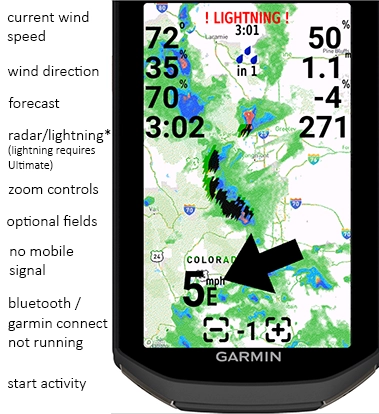
Na zdjęciu: Garmin 1050 z WindField Ultimate. Nie wszystkie funkcje działają na wszystkich urządzeniach ani w każdym planie subskrypcji.
Co mówią kolarze
Ocena 4.7 ★ od 692 sportowców w sklepie Garmin Connect IQ, ponad 100 000 instalacji.
“Uwielbiam to!!! Świetnie jest widzieć kierunek wiatru względem licznika. Jeśli kupujesz tylko jedną aplikację, rozważ właśnie tę.”
Fuzzy, opinia w Garmin Connect IQ“Świetna aplikacja od bardzo komunikatywnego twórcy. Uwielbiam też dane pogodowe, które dodaje do moich aktywności na Strava.”
Jonathan W., opinia w Garmin Connect IQ“Jeśli masz tylko jedną szansę, jeden strzał, jeden budżet na pole danych, to powinien być właśnie ten wybór. Wiedzieć o kłopotach z wiatrem, zanim jeszcze się z nimi zmierzysz, to bezcenne. Warte każdej złotówki.”
Phillip N., opinia w Garmin Connect IQPolecane przez GPLama · Uznane przez Best Garmin Apps za najlepsze pole danych Garmin dla kolarzy · Przeczytaj wszystkie opinie
Jak zainstalować
Uruchom WindField na swoim urządzeniu w kilka minut.

Obejrzyj film o instalacji
Zaplanuj przejażdżkę z uwzględnieniem pogody
Planer pogody na trasie wczytuje Twoje zapisane trasy ze Strava lub RideWithGPS, pyta o godzinę wyjazdu i pokazuje prognozę w 8 punktach wzdłuż całej trasy: wiatr, temperaturę, deszcz oraz ocenę warunków jazdy.
- Działa z zapisanymi trasami ze Strava i RideWithGPS
- Uwzględnia Twoje tempo w każdym punkcie trasy
- Podpowiada lepszą godzinę wyjazdu, gdy warunki się poprawią
Cennik
Wybierz poziom inteligencji pogodowej dla siebie.
Darmowy
Podstawowe informacje o warunkach dla rekreacyjnych kolarzy.
- Aktualizacje pogody co 60 minut
- 1 źródło pogody
- 1 opcjonalne pole danych
PRO
Pogoda pod kontrolą w codziennych aktywnościach.
- Aktualizacje pogody co 10 minut
- Automatycznie wybiera najdokładniejsze źródło
- 4 profesjonalne źródła danych pogodowych
- 2–10 konfigurowalnych pól danych
- Obrazy radarowe co 30 minut, z aktywnymi pożarami lasów
- Dane o jakości powietrza
- Tryb wyścigowy: 4 godziny danych o wietrze i temperaturze bez telefonu
- Integracja ze Strava i RWGPS
- Zamówienia strojów drużynowych (koszt + wysyłka)
+ 6 aplikacji bonusowych — co to takiego?
SubskrybujUltimate
Zaawansowane funkcje i maksymalne bezpieczeństwo w zmiennych warunkach.
- Planowanie trasy z uwzględnieniem pogody w przeglądarce
- Aktualizacje pogody co 5 minut
- Monitorowanie wyładowań atmosferycznych w czasie rzeczywistym*
- Powiadomienia o ukończeniu trasy dla wskazanego kontaktu
- Codzienny e-mail z briefingiem przed wyjazdem
- Sterowanie powiększeniem radaru, obrazy co 10 minut
- Średnia z wielu źródeł pogody
- Tryb wyścigowy: 4 godziny danych o wietrze i temperaturze bez telefonu
- Integracja ze Strava i RWGPS, nagrody i ponowne publikowanie
- Bezpłatna wysyłka na terenie USA przy zamówieniach strojów drużynowych
+ 9 aplikacji bonusowych — co to takiego?
SubskrybujPorównaj wszystkie funkcje i obsługiwane urządzenia →
Najczęściej zadawane pytania
Odpowiedź najpewniej znajdziesz tutaj.
Skąd wziąć kod urządzenia?
Urządzenie generuje go automatycznie. Po zainstalowaniu WindField kod pojawia się na ekranie co kilka minut. Garmin: aplikacja Connect IQ → Urządzenie → Pola danych → WindField → Ustawienia. Karoo: zeskanuj kod QR w ustawieniach rozszerzenia.
Jak zainstalować WindField?
Zobacz, jak zainstalować. Pobierz aplikację przez Garmin Connect IQ na telefonie, a potem dodaj WindField jako pole danych. Po kilku minutach pojawi się kod, który wpisz powyżej, aby się zarejestrować.
Co oznacza „Install Queued”?
Otwórz aplikację Garmin Connect i zsynchronizuj urządzenie Garmin.
Co, jeśli mam kilka urządzeń?
Kup PRO lub Ultimate na pierwsze urządzenie, a Twoje pozostałe płatne subskrypcje automatycznie zostaną podniesione o jeden poziom. Plan darmowy nie jest objęty tą zasadą.
Jak zmienić ustawienia?
Skorzystaj z aplikacji Garmin Connect IQ na telefonie. Starsze urządzenia (Edge 520 i 820) korzystają z Garmin Connect.
Które źródło pogody jest najlepsze dla mojej okolicy?
W planach PRO i Ultimate wybierz opcję Zalecane. Wybierze najlepsze źródło dla Twojej okolicy i sprawdzi je ponownie w trakcie jazdy.
Czy jest bezpłatny okres próbny?
Tak. Każda nowa instalacja otrzymuje 7-dniowy okres próbny z pełnym zestawem funkcji, bez karty płatniczej i rejestracji.
Czy mogę zrezygnować w dowolnym momencie?
Tak. Zrezygnuj ze swojego konta na my.windfield.app, a plan będzie działać do końca opłaconego okresu.
Czy potrzebuję subskrypcji?
Nie. Plan darmowy działa bez końca z aktualizacjami co godzinę. Plany płatne dodają szybsze aktualizacje, radar, wykrywanie wyładowań atmosferycznych, jakość powietrza, Planer pogody na trasie i aplikacje bonusowe.

Regulamin i Polityka prywatności poniżej są w języku angielskim. Wiążąca jest wersja angielska.
Terms of Service
Disclaimer: Use at Your Own Risk
The information provided by WindField.app is for general informational purposes only. While we strive to offer accurate, timely, and reliable weather data, we do not guarantee the accuracy, completeness, or suitability of any data, forecasts, or visualizations displayed on this site or in any related services.
No Warranties
WindField.app is provided “as is” without any express or implied warranties of any kind, including but not limited to warranties of merchantability, fitness for a particular purpose, or non-infringement.
Not for Life-Saving Decisions
This app is not intended for emergency or critical decision-making, including but not limited to aviation, marine navigation, firefighting, or disaster planning. Always consult official sources such as your local meteorological authority or emergency services when lives or property are at stake. This expressly includes lightning detection and storm alerts, which may be delayed, incomplete, or unavailable in your area. Never use WindField as your sole means of lightning awareness.
Limitation of Liability
Under no circumstances shall WindField.app, its creators, or affiliates be liable for any damages or losses arising from your use of or reliance on this service. This includes, without limitation, direct, indirect, incidental, or consequential damages.
Third-Party Data
WindField.app uses data from third-party providers. We do not control or guarantee the accuracy, relevance, or reliability of such data and are not responsible for any errors or delays in that content.
By using WindField.app and its associated apps, you acknowledge and accept this disclaimer in full.
Privacy Policy
Last updated: Jun 2026
1. Who We Are
WindField LLC operates this website and is the data controller for personal data collected through it.
Contact: scott@windfield.app
2. Information We Collect
We collect personal information when you create an account or make a purchase, including:
- Name
- Email address
- Billing information
- Login credentials
- Transaction details
We do not store full credit card numbers.
3. Payments
Payments are processed securely by PayPal and Stripe. Payment information is handled directly by these providers in accordance with their privacy policies. We receive confirmation details such as transaction ID and billing information.
4. Connected Fitness Services
If you choose to connect a third-party fitness account (such as Garmin Connect™, Strava, RideWithGPS, or Hammerhead), WindField accesses a limited set of your activity data through that provider's API to personalize your weather briefings and route planning.
What we collect: for each recent activity we receive the activity type, start time, duration, and the starting latitude/longitude. From Garmin this is obtained via the Garmin Activity API after you grant permission.
How we use it: solely to learn your typical ride times and general riding area so your daily pre-flight weather briefing is timed and localized for you. We do not use this data for advertising and we do not sell it.
Storage & retention: a rolling summary of your recent activities and your authorization tokens are stored on our servers and are deleted when you disconnect the service or revoke access in the provider's account (for example, in your Garmin Connect account).
Third-party AI processing: the wording of your weather briefing is generated using a third-party AI text service (Anthropic). Only weather forecast values and a small set of de-identified scheduling cues derived from your activity history — your typical ride days, start time, and ride duration — are shared with that service. We never share your location or GPS coordinates, your individual activity records, or any personal identifiers (such as your name, email, or provider account ID), and this data is not used to train AI models.
Your control: you can disconnect at any time from your WindField account settings or from the connected provider's account, which stops all further data access and removes the data described above.
4a. Sending Course Bible Routes to Garmin Connect™
If you choose “Send to Garmin Connect” on a Course Bible route, WindField uses the Garmin Courses API, with your separate permission, to create a course in your Garmin Connect account.
What we send to Garmin: only the route you chose — its name, distance, elevation, track points (latitude, longitude, elevation) and the course points WindField added, such as climbs, food and water stops. It is sent only when you press the button.
What we receive and store: the authorization tokens Garmin issues for this connection, and the ID of the course that was created (kept for up to 90 days so a repeat send replaces it rather than duplicating it). We do not read your Garmin Connect courses or other Garmin data through this connection; we only ask Garmin which permissions you granted. When you disconnect Garmin Connect in your WindField account settings, we deregister you at Garmin and delete these tokens right away; you can also revoke access at any time in your Garmin account, which makes the tokens unusable. The stored course ID simply expires after 90 days. A course already in your Garmin Connect account stays there until you delete it in Garmin Connect.
Third parties: your Garmin data is not shared with any third party, and no AI service is involved in sending a route to Garmin. When a Course Bible is built, route coordinates from your own saved Strava or RideWithGPS route are used to look up nearby places, photos and elevation from mapping and reference services; no Garmin account data is part of those lookups.
5. Cookies
We use essential cookies necessary for the operation of this website, including:
- Authentication and login cookies
- Session management cookies
These cookies are required for the website to function properly.
6. Legal Basis for Processing (GDPR)
If you are located in the EU/EEA, we process your personal data on the following legal bases:
- Performance of a contract
- Compliance with legal obligations
- Legitimate interests in operating and securing our services
7. Data Retention
We retain personal data only as long as necessary to provide services and comply with legal obligations.
8. Your Rights
If you are located in the EU/EEA, you have the right to:
- Access your personal data
- Request correction
- Request deletion
- Object to processing
- Request data portability
- Lodge a complaint with your local data protection authority
To exercise your rights, contact: scott@windfield.app