
De originele live wind-app
#1 ConnectIQ-weerveld, al 7 jaar op rij
#1 datafield voor wielrennen op Best Garmin Apps
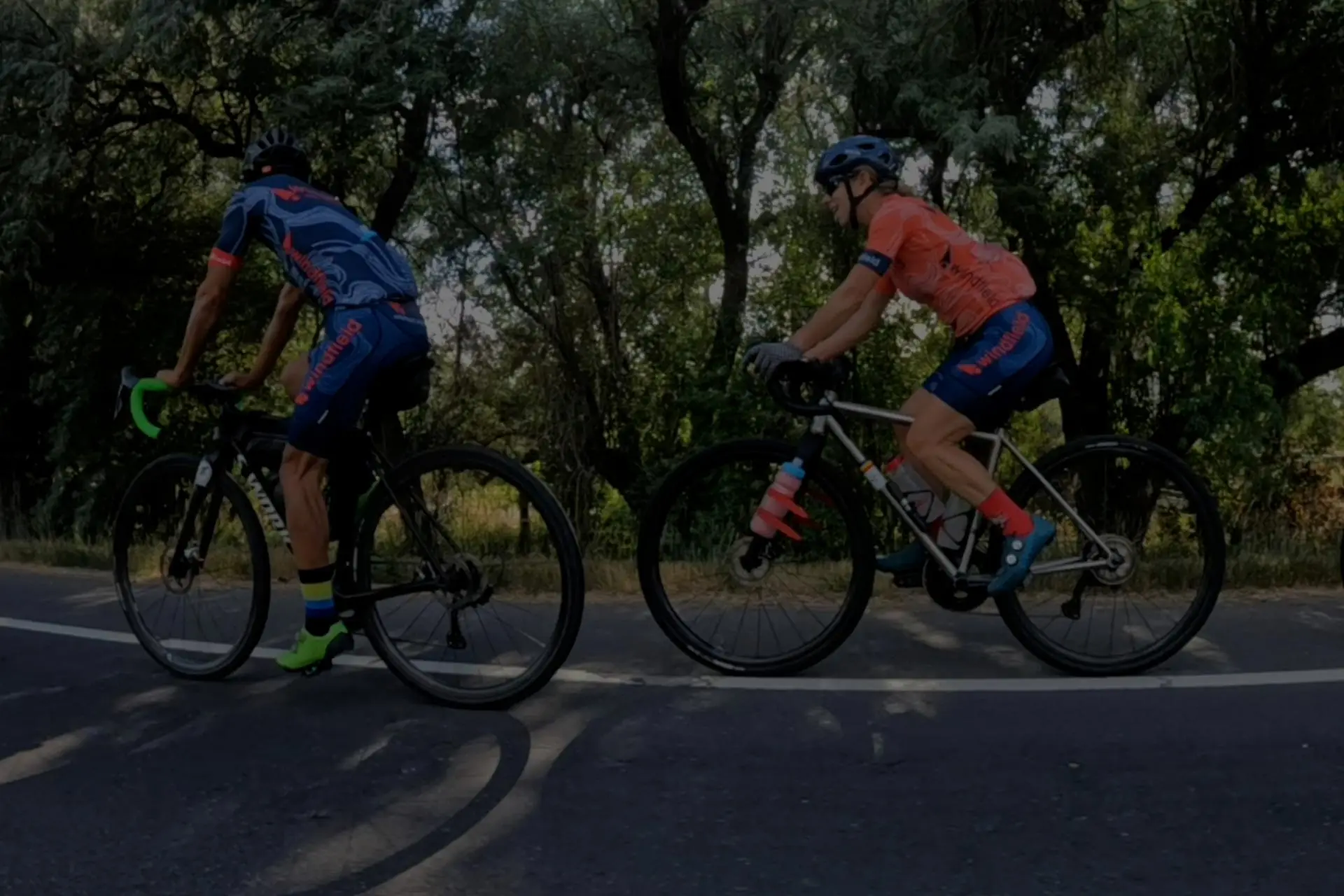
Live windsnelheid en windrichting, radar en bliksemwaarschuwingen op het activiteitenscherm van je Garmin of Karoo, zodat je slimmer fietst en veilig blijft.
 Garmin
 Karoo
★ Elke nieuwe installatie bevat een gratis proefperiode van 7 dagen met alle functies.
Abonneer je op WindField
Live wind en weer wereldwijd.
Op elk moment opzegbaar · Veilig afrekenen via Stripe of PayPal · Voorwaarden
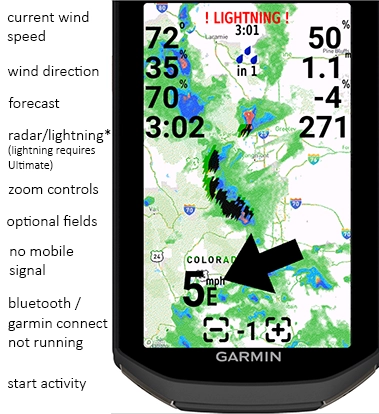
Getoond: Garmin 1050 met WindField Ultimate. Niet alle functies werken op alle apparaten of abonnementsniveaus.
Wat fietsers zeggen
Beoordeeld met 4,7 ★ door 692 sporters in de Garmin Connect IQ store, met meer dan 100.000 installaties.
“Geweldig!!! Het is top om de windrichting ten opzichte van de fietscomputer te zien. Als je maar één app koopt, overweeg dan deze.”
Fuzzy, review in Garmin Connect IQ“Geweldige app, van een erg responsieve ontwikkelaar. Ik vind de weergegevens die hij aan mijn Strava-uploads toevoegt ook fantastisch.”
Jonathan W., review in Garmin Connect IQ“Als je maar één kans, één schot, één budget hebt voor een datafield, dan moet dit de keuze zijn. Je windproblemen kennen voordat je ze tegenkomt is onbetaalbaar. Elke cent waard.”
Phillip N., review in Garmin Connect IQBekend van GPLama · Uitgeroepen tot beste Garmin-datafield voor wielrennen door Best Garmin Apps · Lees alle reviews
Zo installeer je het
Zet WindField in een paar minuten aan de praat op je apparaat.

Bekijk de installatievideo
Plan je rit rond het weer
De Route Weather Planner laadt je opgeslagen Strava- of RideWithGPS-routes, vraagt om een vertrektijd en toont een voorspelling met 8 punten langs de hele route: wind, temperatuur, regen en een ritscore.
- Werkt met opgeslagen Strava- en RideWithGPS-routes
- Houdt rekening met jouw tempo bij elk waypoint
- Stelt een beter vertrekmoment voor als de omstandigheden verbeteren
Prijzen
Kies je niveau van weerintelligentie.
Gratis
Basisomstandigheden voor recreatieve fietsers.
- Weerupdates elke 60 minuten
- 1 weerbron
- 1 optioneel datafield
PRO
Weerbewustzijn voor dagelijkse activiteiten.
- Weerupdates elke 10 minuten
- Kiest automatisch de nauwkeurigste bron
- 4 professionele weerdatabronnen
- 2–10 aanpasbare datavelden
- Radarbeelden elke 30 minuten, met actieve natuurbranden
- Luchtkwaliteitsgegevens
- Race Mode: 4 uur wind en temperatuur zonder telefoon
- Strava- en RWGPS-integratie
- Bestellingen van teamkleding (kosten + verzending)
+ 6 bonusapps — wat zijn dat?
AbonnerenUltimate
Geavanceerde functies en maximale veiligheid bij wisselende omstandigheden.
- Webgebaseerde ritplanning rond het weer
- Weerupdates elke 5 minuten
- Realtime bliksemmonitoring*
- Aankomstmeldingen voor een aangewezen contactpersoon
- Dagelijkse Pre-Flight Briefing per e-mail
- Radar-zoomknoppen, beelden elke 10 minuten
- Gemiddelde over meerdere weerbronnen
- Race Mode: 4 uur wind en temperatuur zonder telefoon
- Strava- en RWGPS-integratie, awards en opnieuw plaatsen
- Gratis verzending in de VS bij bestellingen van teamkleding
+ 9 bonusapps — wat zijn dat?
AbonnerenVergelijk alle functies en ondersteunde apparaten →
Veelgestelde vragen
Je antwoord staat hier waarschijnlijk tussen.
Hoe krijg ik een apparaatcode?
Je apparaat genereert de code automatisch. Zodra WindField is geïnstalleerd, verschijnt de code om de paar minuten op het scherm. Garmin: Connect IQ-app → Apparaat → Datavelden → WindField → Instellingen. Karoo: scan de QR-code in de extensie-instellingen.
Hoe installeer ik WindField?
Bekijk hoe je het installeert. Download het met de Garmin Connect IQ-app op je telefoon en voeg WindField daarna toe als datafield. Na een paar minuten verschijnt er een code, die je hierboven invoert om je te registreren.
Wat betekent Install Queued?
Open de Garmin Connect-app en synchroniseer je Garmin.
Wat als ik meerdere apparaten heb?
Koop PRO of Ultimate op het eerste apparaat en je andere betaalde abonnementen worden automatisch één niveau opgewaardeerd. Het gratis abonnement komt hiervoor niet in aanmerking.
Hoe wijzig ik de instellingen?
Gebruik de Garmin Connect IQ-app op je telefoon. Oudere apparaten (Edge 520 en 820) gebruiken Garmin Connect.
Welke weerbron is het beste voor mijn regio?
Kies Aanbevolen in PRO en Ultimate. Die optie kiest de beste bron voor jouw regio en controleert dat tijdens je rit opnieuw.
Is er een gratis proefperiode?
Ja. Elke nieuwe installatie krijgt een proefperiode van 7 dagen met alle functies, zonder kaart of aanmelding.
Kan ik op elk moment opzeggen?
Ja. Zeg op via je account op my.windfield.app en je abonnement blijft werken tot het einde van de periode waarvoor je hebt betaald.
Heb ik een abonnement nodig?
Nee. Het gratis abonnement werkt voor altijd, met updates per uur. Betaalde abonnementen voegen snellere updates, radar, bliksem, luchtkwaliteit, de Route Weather Planner en bonusapps toe.

De Servicevoorwaarden en het Privacybeleid hieronder zijn in het Engels. De Engelse tekst is de bindende versie.
Terms of Service
Disclaimer: Use at Your Own Risk
The information provided by WindField.app is for general informational purposes only. While we strive to offer accurate, timely, and reliable weather data, we do not guarantee the accuracy, completeness, or suitability of any data, forecasts, or visualizations displayed on this site or in any related services.
No Warranties
WindField.app is provided “as is” without any express or implied warranties of any kind, including but not limited to warranties of merchantability, fitness for a particular purpose, or non-infringement.
Not for Life-Saving Decisions
This app is not intended for emergency or critical decision-making, including but not limited to aviation, marine navigation, firefighting, or disaster planning. Always consult official sources such as your local meteorological authority or emergency services when lives or property are at stake. This expressly includes lightning detection and storm alerts, which may be delayed, incomplete, or unavailable in your area. Never use WindField as your sole means of lightning awareness.
Limitation of Liability
Under no circumstances shall WindField.app, its creators, or affiliates be liable for any damages or losses arising from your use of or reliance on this service. This includes, without limitation, direct, indirect, incidental, or consequential damages.
Third-Party Data
WindField.app uses data from third-party providers. We do not control or guarantee the accuracy, relevance, or reliability of such data and are not responsible for any errors or delays in that content.
By using WindField.app and its associated apps, you acknowledge and accept this disclaimer in full.
Privacy Policy
Last updated: Jun 2026
1. Who We Are
WindField LLC operates this website and is the data controller for personal data collected through it.
Contact: scott@windfield.app
2. Information We Collect
We collect personal information when you create an account or make a purchase, including:
- Name
- Email address
- Billing information
- Login credentials
- Transaction details
We do not store full credit card numbers.
3. Payments
Payments are processed securely by PayPal and Stripe. Payment information is handled directly by these providers in accordance with their privacy policies. We receive confirmation details such as transaction ID and billing information.
4. Connected Fitness Services
If you choose to connect a third-party fitness account (such as Garmin Connect™, Strava, RideWithGPS, or Hammerhead), WindField accesses a limited set of your activity data through that provider's API to personalize your weather briefings and route planning.
What we collect: for each recent activity we receive the activity type, start time, duration, and the starting latitude/longitude. From Garmin this is obtained via the Garmin Activity API after you grant permission.
How we use it: solely to learn your typical ride times and general riding area so your daily pre-flight weather briefing is timed and localized for you. We do not use this data for advertising and we do not sell it.
Storage & retention: a rolling summary of your recent activities and your authorization tokens are stored on our servers and are deleted when you disconnect the service or revoke access in the provider's account (for example, in your Garmin Connect account).
Third-party AI processing: the wording of your weather briefing is generated using a third-party AI text service (Anthropic). Only weather forecast values and a small set of de-identified scheduling cues derived from your activity history — your typical ride days, start time, and ride duration — are shared with that service. We never share your location or GPS coordinates, your individual activity records, or any personal identifiers (such as your name, email, or provider account ID), and this data is not used to train AI models.
Your control: you can disconnect at any time from your WindField account settings or from the connected provider's account, which stops all further data access and removes the data described above.
4a. Sending Course Bible Routes to Garmin Connect™
If you choose “Send to Garmin Connect” on a Course Bible route, WindField uses the Garmin Courses API, with your separate permission, to create a course in your Garmin Connect account.
What we send to Garmin: only the route you chose — its name, distance, elevation, track points (latitude, longitude, elevation) and the course points WindField added, such as climbs, food and water stops. It is sent only when you press the button.
What we receive and store: the authorization tokens Garmin issues for this connection, and the ID of the course that was created (kept for up to 90 days so a repeat send replaces it rather than duplicating it). We do not read your Garmin Connect courses or other Garmin data through this connection; we only ask Garmin which permissions you granted. When you disconnect Garmin Connect in your WindField account settings, we deregister you at Garmin and delete these tokens right away; you can also revoke access at any time in your Garmin account, which makes the tokens unusable. The stored course ID simply expires after 90 days. A course already in your Garmin Connect account stays there until you delete it in Garmin Connect.
Third parties: your Garmin data is not shared with any third party, and no AI service is involved in sending a route to Garmin. When a Course Bible is built, route coordinates from your own saved Strava or RideWithGPS route are used to look up nearby places, photos and elevation from mapping and reference services; no Garmin account data is part of those lookups.
5. Cookies
We use essential cookies necessary for the operation of this website, including:
- Authentication and login cookies
- Session management cookies
These cookies are required for the website to function properly.
6. Legal Basis for Processing (GDPR)
If you are located in the EU/EEA, we process your personal data on the following legal bases:
- Performance of a contract
- Compliance with legal obligations
- Legitimate interests in operating and securing our services
7. Data Retention
We retain personal data only as long as necessary to provide services and comply with legal obligations.
8. Your Rights
If you are located in the EU/EEA, you have the right to:
- Access your personal data
- Request correction
- Request deletion
- Object to processing
- Request data portability
- Lodge a complaint with your local data protection authority
To exercise your rights, contact: scott@windfield.app