
Die Original-Live-Wind-App
Das Nr. 1 Wetterfeld auf ConnectIQ, seit 7 Jahren in Folge
Das Nr. 1 Radsport-Datenfeld auf Best Garmin Apps
Live-Windgeschwindigkeit und -richtung sowie Radar- und Blitzwarnungen direkt auf dem Aktivitätsbildschirm deines Garmin oder Karoo – damit du smarter fährst und sicher unterwegs bist.
 Garmin
 Karoo
★ Jede Neuinstallation enthält eine 7-tägige kostenlose Testphase mit allen Funktionen.
WindField abonnieren
Live-Wind und -Wetter weltweit.
Jederzeit kündbar · Sicherer Checkout über Stripe oder PayPal · Bedingungen
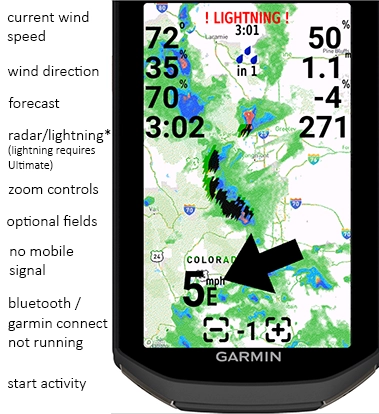
Garmin 1050 mit WindField Ultimate abgebildet. Nicht alle Funktionen sind auf allen Geräten oder in allen Abostufen verfügbar.
Das sagen Radfahrer
Mit 4,7 ★ von 692 Sportlern im Garmin Connect IQ Store bewertet, bei über 100.000 Installationen.
“Ich liebe es!!! Es ist großartig, die Windrichtung relativ zum Radcomputer zu sehen. Wenn du nur eine App kaufst, solltest du diese in Betracht ziehen.”
Fuzzy, Garmin Connect IQ-Rezension“Großartige App von einem sehr reaktionsschnellen Entwickler. Auch die Wetterdaten, die sie zu meinen Strava-Uploads hinzufügt, gefallen mir sehr.”
Jonathan W., Garmin Connect IQ-Rezension“Wenn du nur eine Chance, einen Schuss, ein Budget für ein Datenfeld hast, sollte es dieses sein. Deine Windprobleme zu kennen, bevor du überhaupt mit ihnen zu tun hast, ist unbezahlbar. Jeden Cent wert.”
Phillip N., Garmin Connect IQ-RezensionVorgestellt von GPLama · Von Best Garmin Apps zum besten Garmin-Datenfeld für Radsport gekürt · Alle Bewertungen lesen
So installierst du WindField
Bring WindField in wenigen Minuten auf dein Gerät.

Installationsvideo ansehen
Plane deine Fahrt rund ums Wetter
Der Routen-Wetterplaner lädt deine gespeicherten Strava- oder RideWithGPS-Routen, nimmt eine Abfahrtszeit entgegen und zeigt eine 8-Punkte-Vorhersage entlang der gesamten Route: Wind, Temperatur, Regen und eine Fahrtbewertung.
- Funktioniert mit gespeicherten Strava- und RideWithGPS-Routen
- Berücksichtigt dein Tempo an jedem Wegpunkt
- Schlägt eine bessere Abfahrtszeit vor, wenn sich die Bedingungen verbessern
Preise
Wähle deine Stufe an Wetterintelligenz.
Kostenlos
Grundlegende Bedingungen für Gelegenheitsfahrer.
- Wetter-Updates alle 60 Minuten
- 1 Wetterquelle
- 1 optionales Datenfeld
PRO
Wetterbewusstsein für tägliche Aktivitäten.
- Wetter-Updates alle 10 Minuten
- Wählt automatisch die genaueste Quelle
- 4 professionelle Wetterdatenquellen
- 2–10 anpassbare Datenfelder
- Radarbilder alle 30 Minuten, mit aktiven Waldbränden
- Luftqualitätsdaten
- Race-Modus: 4 Stunden Wind und Temperatur ohne Smartphone
- Strava- und RWGPS-Integration
- Teamkit-Bestellungen (Kosten + Versand)
+ 6 Bonus-Apps — Was ist das?
AbonnierenUltimate
Erweiterte Funktionen und maximale Sicherheit bei wechselnden Bedingungen.
- Webbasierte Fahrtplanung rund ums Wetter
- Wetter-Updates alle 5 Minuten
- Blitzüberwachung in Echtzeit*
- Ziel-Benachrichtigungen für eine festgelegte Kontaktperson
- Tägliche Pre-Flight-Briefing-E-Mail
- Radar-Zoomsteuerung, Bilder alle 10 Minuten
- Durchschnitt über mehrere Wetterquellen
- Race-Modus: 4 Stunden Wind und Temperatur ohne Smartphone
- Strava- und RWGPS-Integration, Awards und erneutes Posten
- Kostenloser Versand innerhalb der USA bei Teamkit-Bestellungen
+ 9 Bonus-Apps — Was ist das?
AbonnierenAlle Funktionen und unterstützten Geräte vergleichen →
Häufig gestellte Fragen
Deine Antwort findest du hier höchstwahrscheinlich.
Wie bekomme ich einen Gerätecode?
Dein Gerät erzeugt ihn automatisch. Sobald WindField installiert ist, erscheint der Code alle paar Minuten auf dem Bildschirm. Garmin: Connect IQ-App → Gerät → Datenfelder → WindField → Einstellungen. Karoo: Scanne den QR-Code in den Erweiterungseinstellungen.
Wie installiere ich WindField?
So funktioniert die Installation. Lade WindField mit der Garmin Connect IQ-App auf deinem Smartphone herunter und füge es dann als Datenfeld hinzu. Nach ein paar Minuten erscheint ein Code, den du oben zur Registrierung eingibst.
Was bedeutet Install Queued?
Öffne die Garmin Connect-App und synchronisiere dein Garmin-Gerät.
Was ist, wenn ich mehrere Geräte habe?
Kaufe PRO oder Ultimate für das erste Gerät, und deine anderen kostenpflichtigen Abonnements werden automatisch um eine Stufe aufgewertet. Der kostenlose Tarif ist davon ausgenommen.
Wie ändere ich die Einstellungen?
Nutze die Garmin Connect IQ-App auf deinem Smartphone. Ältere Geräte (Edge 520 und 820) verwenden Garmin Connect.
Welche Wetterquelle ist für meine Region die beste?
Wähle in PRO und Ultimate die Option „Empfohlen“. Sie sucht die beste Quelle für deine Region aus und prüft während deiner Fahrt erneut.
Gibt es eine kostenlose Testphase?
Ja. Jede Neuinstallation erhält eine 7-tägige Testphase mit allen Funktionen – ohne Karte und ohne Anmeldung.
Kann ich jederzeit kündigen?
Ja. Kündige in deinem Konto unter my.windfield.app, und dein Tarif funktioniert weiter, bis der bezahlte Zeitraum endet.
Brauche ich ein Abonnement?
Nein. Der kostenlose Tarif funktioniert für immer mit stündlichen Updates. Kostenpflichtige Tarife bieten schnellere Updates, Radar, Blitze, Luftqualität, den Routen-Wetterplaner und Bonus-Apps.

Die Nutzungsbedingungen und die Datenschutzerklärung unten sind auf Englisch verfasst. Der englische Text ist die verbindliche Fassung.
Terms of Service
Disclaimer: Use at Your Own Risk
The information provided by WindField.app is for general informational purposes only. While we strive to offer accurate, timely, and reliable weather data, we do not guarantee the accuracy, completeness, or suitability of any data, forecasts, or visualizations displayed on this site or in any related services.
No Warranties
WindField.app is provided “as is” without any express or implied warranties of any kind, including but not limited to warranties of merchantability, fitness for a particular purpose, or non-infringement.
Not for Life-Saving Decisions
This app is not intended for emergency or critical decision-making, including but not limited to aviation, marine navigation, firefighting, or disaster planning. Always consult official sources such as your local meteorological authority or emergency services when lives or property are at stake. This expressly includes lightning detection and storm alerts, which may be delayed, incomplete, or unavailable in your area. Never use WindField as your sole means of lightning awareness.
Limitation of Liability
Under no circumstances shall WindField.app, its creators, or affiliates be liable for any damages or losses arising from your use of or reliance on this service. This includes, without limitation, direct, indirect, incidental, or consequential damages.
Third-Party Data
WindField.app uses data from third-party providers. We do not control or guarantee the accuracy, relevance, or reliability of such data and are not responsible for any errors or delays in that content.
By using WindField.app and its associated apps, you acknowledge and accept this disclaimer in full.
Privacy Policy
Last updated: Jun 2026
1. Who We Are
WindField LLC operates this website and is the data controller for personal data collected through it.
Contact: scott@windfield.app
2. Information We Collect
We collect personal information when you create an account or make a purchase, including:
- Name
- Email address
- Billing information
- Login credentials
- Transaction details
We do not store full credit card numbers.
3. Payments
Payments are processed securely by PayPal and Stripe. Payment information is handled directly by these providers in accordance with their privacy policies. We receive confirmation details such as transaction ID and billing information.
4. Connected Fitness Services
If you choose to connect a third-party fitness account (such as Garmin Connect™, Strava, RideWithGPS, or Hammerhead), WindField accesses a limited set of your activity data through that provider's API to personalize your weather briefings and route planning.
What we collect: for each recent activity we receive the activity type, start time, duration, and the starting latitude/longitude. From Garmin this is obtained via the Garmin Activity API after you grant permission.
How we use it: solely to learn your typical ride times and general riding area so your daily pre-flight weather briefing is timed and localized for you. We do not use this data for advertising and we do not sell it.
Storage & retention: a rolling summary of your recent activities and your authorization tokens are stored on our servers and are deleted when you disconnect the service or revoke access in the provider's account (for example, in your Garmin Connect account).
Third-party AI processing: the wording of your weather briefing is generated using a third-party AI text service (Anthropic). Only weather forecast values and a small set of de-identified scheduling cues derived from your activity history — your typical ride days, start time, and ride duration — are shared with that service. We never share your location or GPS coordinates, your individual activity records, or any personal identifiers (such as your name, email, or provider account ID), and this data is not used to train AI models.
Your control: you can disconnect at any time from your WindField account settings or from the connected provider's account, which stops all further data access and removes the data described above.
4a. Sending Course Bible Routes to Garmin Connect™
If you choose “Send to Garmin Connect” on a Course Bible route, WindField uses the Garmin Courses API, with your separate permission, to create a course in your Garmin Connect account.
What we send to Garmin: only the route you chose — its name, distance, elevation, track points (latitude, longitude, elevation) and the course points WindField added, such as climbs, food and water stops. It is sent only when you press the button.
What we receive and store: the authorization tokens Garmin issues for this connection, and the ID of the course that was created (kept for up to 90 days so a repeat send replaces it rather than duplicating it). We do not read your Garmin Connect courses or other Garmin data through this connection; we only ask Garmin which permissions you granted. When you disconnect Garmin Connect in your WindField account settings, we deregister you at Garmin and delete these tokens right away; you can also revoke access at any time in your Garmin account, which makes the tokens unusable. The stored course ID simply expires after 90 days. A course already in your Garmin Connect account stays there until you delete it in Garmin Connect.
Third parties: your Garmin data is not shared with any third party, and no AI service is involved in sending a route to Garmin. When a Course Bible is built, route coordinates from your own saved Strava or RideWithGPS route are used to look up nearby places, photos and elevation from mapping and reference services; no Garmin account data is part of those lookups.
5. Cookies
We use essential cookies necessary for the operation of this website, including:
- Authentication and login cookies
- Session management cookies
These cookies are required for the website to function properly.
6. Legal Basis for Processing (GDPR)
If you are located in the EU/EEA, we process your personal data on the following legal bases:
- Performance of a contract
- Compliance with legal obligations
- Legitimate interests in operating and securing our services
7. Data Retention
We retain personal data only as long as necessary to provide services and comply with legal obligations.
8. Your Rights
If you are located in the EU/EEA, you have the right to:
- Access your personal data
- Request correction
- Request deletion
- Object to processing
- Request data portability
- Lodge a complaint with your local data protection authority
To exercise your rights, contact: scott@windfield.app