
Den oprindelige live-vindapp
#1 ConnectIQ-vejrfelt, 7 år i træk
#1 cykeldatafelt på Best Garmin Apps
Live vindhastighed og vindretning samt radar- og lynadvarsler på din Garmin- eller Karoo-aktivitetsskærm, så du kan cykle klogere og holde dig sikker.
 Garmin
 Karoo
★ Hver ny installation inkluderer en 7-dages gratis prøveperiode med alle funktioner.
Abonnér på WindField
Live vind og vejr over hele verden.
Opsig når som helst · Sikker betaling via Stripe eller PayPal · Vilkår
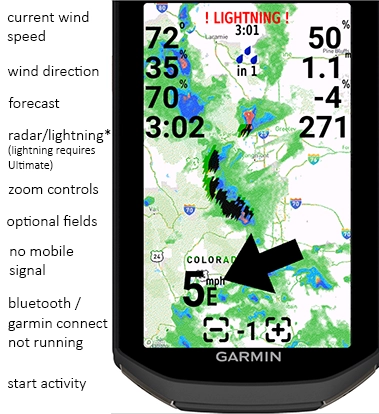
Garmin 1050 med WindField Ultimate vist. Ikke alle funktioner virker på alle enheder eller abonnementsniveauer.
Hvad cyklisterne siger
Bedømt til 4.7 ★ af 692 atleter i Garmin Connect IQ store med over 100.000 installationer.
“Elsker den!!! Det er fedt at se vindretningen i forhold til cykelcomputeren. Hvis du kun køber én app, vil jeg foreslå, at du overvejer denne.”
Fuzzy, Garmin Connect IQ-anmeldelse“Fantastisk app fra en meget lydhør udvikler. Jeg elsker også de vejrstatistikker, den tilføjer til mine Strava-uploads.”
Jonathan W., Garmin Connect IQ-anmeldelse“Hvis du kun har én chance, ét skud, ét budget til et datafelt, så bør det være dette. At kende dine vindudfordringer, før du overhovedet møder dem, er uvurderligt. Hver en krone værd.”
Phillip N., Garmin Connect IQ-anmeldelseOmtalt af GPLama · Kåret som bedste Garmin-datafelt til cykling af Best Garmin Apps · Læs alle anmeldelser
Sådan installerer du
Få WindField op at køre på din enhed på få minutter.

Se installationsvideoen
Planlæg din tur efter vejret
Rutevejr-planlæggeren henter dine gemte Strava- eller RideWithGPS-ruter, tager en afgangstid og viser en prognose med 8 punkter langs hele ruten: vind, temperatur, regn og en turscore.
- Virker med gemte Strava- og RideWithGPS-ruter
- Tager højde for dit tempo ved hvert waypoint
- Foreslår et bedre afgangstidspunkt, når forholdene bliver bedre
Priser
Vælg dit niveau af vejrintelligens.
Gratis
Grundlæggende forhold til den afslappede cyklist.
- Vejropdateringer hvert 60. minut
- 1 vejrkilde
- 1 valgfrit datafelt
PRO
Vejrbevidsthed til de daglige aktiviteter.
- Vejropdateringer hvert 10. minut
- Vælger automatisk den mest præcise kilde
- 4 professionelle vejrdatakilder
- 2–10 tilpasselige datafelter
- Radarbilleder hvert 30. minut, med aktive skovbrande
- Luftkvalitetsdata
- Race Mode: 4 timers vind og temperatur uden telefon
- Strava- og RWGPS-integration
- Bestilling af holdtøj (pris + fragt)
+ 6 bonusapps — hvad er det?
AbonnérUltimate
Avancerede funktioner og maksimal sikkerhed i skiftende forhold.
- Webbaseret turplanlægning efter vejret
- Vejropdateringer hvert 5. minut
- Overvågning af lyn i realtid*
- Målalarmer til en udpeget kontaktperson
- Daglig Pre-Flight Briefing-mail
- Zoomkontroller til radar, billeder hvert 10. minut
- Gennemsnit på tværs af vejrkilder
- Race Mode: 4 timers vind og temperatur uden telefon
- Strava- og RWGPS-integration, awards og genpostning
- Gratis forsendelse i USA ved bestilling af holdtøj
+ 9 bonusapps — hvad er det?
AbonnérSammenlign alle funktioner og understøttede enheder →
Ofte stillede spørgsmål
Dit svar står med størst sandsynlighed herunder.
Hvordan får jeg en enhedskode?
Din enhed genererer den automatisk. Når WindField er installeret, vises koden på skærmen med få minutters mellemrum. Garmin: Connect IQ-appen → Enhed → Datafelter → WindField → Indstillinger. Karoo: scan QR-koden i udvidelsens indstillinger.
Hvordan installerer jeg WindField?
Se, hvordan du installerer det. Download det med Garmin Connect IQ-appen på din telefon, og tilføj derefter WindField som datafelt. Efter et par minutter vises en kode, som du indtaster ovenfor for at registrere dig.
Hvad betyder Install Queued?
Åbn Garmin Connect-appen og synkronisér din Garmin.
Hvad hvis jeg har flere enheder?
Køb PRO eller Ultimate til den første enhed, så bliver dine øvrige betalte abonnementer automatisk opgraderet ét niveau. Gratis-abonnementet er ikke omfattet.
Hvordan ændrer jeg indstillingerne?
Brug Garmin Connect IQ-appen på din telefon. Ældre enheder (Edge 520 og 820) bruger Garmin Connect.
Hvilken vejrkilde er bedst i mit område?
Vælg Anbefalet i PRO og Ultimate. Den vælger den bedste kilde til dit område og tjekker igen undervejs på turen.
Er der en gratis prøveperiode?
Ja. Hver ny installation får en 7-dages prøveperiode med alle funktioner – uden kort eller oprettelse.
Kan jeg opsige når som helst?
Ja. Opsig fra din konto på my.windfield.app, så fortsætter dit abonnement, indtil den periode, du har betalt for, udløber.
Skal jeg have et abonnement?
Nej. Gratis-abonnementet virker for evigt med opdateringer hver time. Betalte abonnementer giver hurtigere opdateringer, radar, lyn, luftkvalitet, Rutevejr-planlæggeren og bonusapps.

Servicevilkårene og privatlivspolitikken nedenfor er på engelsk. Den engelske tekst er den gældende version.
Terms of Service
Disclaimer: Use at Your Own Risk
The information provided by WindField.app is for general informational purposes only. While we strive to offer accurate, timely, and reliable weather data, we do not guarantee the accuracy, completeness, or suitability of any data, forecasts, or visualizations displayed on this site or in any related services.
No Warranties
WindField.app is provided “as is” without any express or implied warranties of any kind, including but not limited to warranties of merchantability, fitness for a particular purpose, or non-infringement.
Not for Life-Saving Decisions
This app is not intended for emergency or critical decision-making, including but not limited to aviation, marine navigation, firefighting, or disaster planning. Always consult official sources such as your local meteorological authority or emergency services when lives or property are at stake. This expressly includes lightning detection and storm alerts, which may be delayed, incomplete, or unavailable in your area. Never use WindField as your sole means of lightning awareness.
Limitation of Liability
Under no circumstances shall WindField.app, its creators, or affiliates be liable for any damages or losses arising from your use of or reliance on this service. This includes, without limitation, direct, indirect, incidental, or consequential damages.
Third-Party Data
WindField.app uses data from third-party providers. We do not control or guarantee the accuracy, relevance, or reliability of such data and are not responsible for any errors or delays in that content.
By using WindField.app and its associated apps, you acknowledge and accept this disclaimer in full.
Privacy Policy
Last updated: Jun 2026
1. Who We Are
WindField LLC operates this website and is the data controller for personal data collected through it.
Contact: scott@windfield.app
2. Information We Collect
We collect personal information when you create an account or make a purchase, including:
- Name
- Email address
- Billing information
- Login credentials
- Transaction details
We do not store full credit card numbers.
3. Payments
Payments are processed securely by PayPal and Stripe. Payment information is handled directly by these providers in accordance with their privacy policies. We receive confirmation details such as transaction ID and billing information.
4. Connected Fitness Services
If you choose to connect a third-party fitness account (such as Garmin Connect™, Strava, RideWithGPS, or Hammerhead), WindField accesses a limited set of your activity data through that provider's API to personalize your weather briefings and route planning.
What we collect: for each recent activity we receive the activity type, start time, duration, and the starting latitude/longitude. From Garmin this is obtained via the Garmin Activity API after you grant permission.
How we use it: solely to learn your typical ride times and general riding area so your daily pre-flight weather briefing is timed and localized for you. We do not use this data for advertising and we do not sell it.
Storage & retention: a rolling summary of your recent activities and your authorization tokens are stored on our servers and are deleted when you disconnect the service or revoke access in the provider's account (for example, in your Garmin Connect account).
Third-party AI processing: the wording of your weather briefing is generated using a third-party AI text service (Anthropic). Only weather forecast values and a small set of de-identified scheduling cues derived from your activity history — your typical ride days, start time, and ride duration — are shared with that service. We never share your location or GPS coordinates, your individual activity records, or any personal identifiers (such as your name, email, or provider account ID), and this data is not used to train AI models.
Your control: you can disconnect at any time from your WindField account settings or from the connected provider's account, which stops all further data access and removes the data described above.
4a. Sending Course Bible Routes to Garmin Connect™
If you choose “Send to Garmin Connect” on a Course Bible route, WindField uses the Garmin Courses API, with your separate permission, to create a course in your Garmin Connect account.
What we send to Garmin: only the route you chose — its name, distance, elevation, track points (latitude, longitude, elevation) and the course points WindField added, such as climbs, food and water stops. It is sent only when you press the button.
What we receive and store: the authorization tokens Garmin issues for this connection, and the ID of the course that was created (kept for up to 90 days so a repeat send replaces it rather than duplicating it). We do not read your Garmin Connect courses or other Garmin data through this connection; we only ask Garmin which permissions you granted. When you disconnect Garmin Connect in your WindField account settings, we deregister you at Garmin and delete these tokens right away; you can also revoke access at any time in your Garmin account, which makes the tokens unusable. The stored course ID simply expires after 90 days. A course already in your Garmin Connect account stays there until you delete it in Garmin Connect.
Third parties: your Garmin data is not shared with any third party, and no AI service is involved in sending a route to Garmin. When a Course Bible is built, route coordinates from your own saved Strava or RideWithGPS route are used to look up nearby places, photos and elevation from mapping and reference services; no Garmin account data is part of those lookups.
5. Cookies
We use essential cookies necessary for the operation of this website, including:
- Authentication and login cookies
- Session management cookies
These cookies are required for the website to function properly.
6. Legal Basis for Processing (GDPR)
If you are located in the EU/EEA, we process your personal data on the following legal bases:
- Performance of a contract
- Compliance with legal obligations
- Legitimate interests in operating and securing our services
7. Data Retention
We retain personal data only as long as necessary to provide services and comply with legal obligations.
8. Your Rights
If you are located in the EU/EEA, you have the right to:
- Access your personal data
- Request correction
- Request deletion
- Object to processing
- Request data portability
- Lodge a complaint with your local data protection authority
To exercise your rights, contact: scott@windfield.app