
The Original Live Wind App
#1 ConnectIQ weather app, 6 years running
Live wind speed and direction, radar and lightning alerts on your Garmin or Karoo activity screen, so you can ride smarter and stay safe.
 Garmin
 Karoo
Karoo★ Every new install includes a 7-day free trial of full features.
Subscribe to WindField
Live wind and weather worldwide.
Cancel anytime · Secure checkout via Stripe or PayPal · Terms
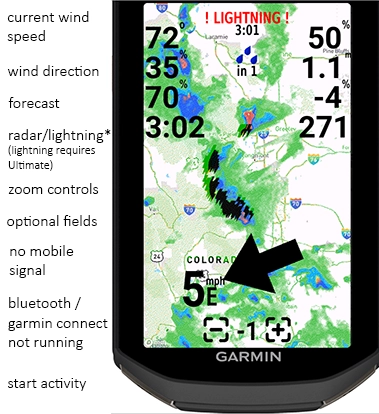
Garmin 1050 with WindField Ultimate shown. Not all features work on all devices or subscription levels.
What riders say
Rated 4.7 ★ by 692 athletes on the Garmin Connect IQ store, with over 100,000 installs.
“Love this!!! It’s great seeing wind direction relative to the head unit. If you only buy one app, I would suggest considering this one.”
Fuzzy, Garmin Connect IQ review“Amazing app, from a very responsive developer. I love the weather stats it adds to my Strava uploads too.”
Jonathan W., Garmin Connect IQ review“If you only have one chance, one shot, one budget for a data field, this should be the choice. Knowing your wind hassles before you even deal with them is invaluable. Worth every penny.”
Phillip N., Garmin Connect IQ reviewAs featured by GPLama, the go-to wind data field. Read all reviews
How to install
Get WindField running on your device in minutes.

Watch the installation video
Plan your ride around the weather
The Route Weather Planner loads your saved Strava or RideWithGPS routes, takes a departure time, and shows an 8-point forecast along the whole route: wind, temperature, rain and a ride score.
- Works with saved Strava and RideWithGPS routes
- Accounts for your pace at each waypoint
- Suggests a better departure time when conditions improve
Pricing
Choose your level of weather intelligence.
Free
Basic conditions for casual riders.
- 60 minute weather updates
- 1 weather source
- 1 optional data field
PRO
Weather awareness for daily activities.
- 10 minute weather updates
- Picks the most accurate source automatically
- 4 professional weather data sources
- 2–10 customizable data fields
- Radar images every 30 minutes, with active wildfires
- Air quality data
- Race Mode: 4 hours of wind and temperature with no phone
- Strava and RWGPS integration
- Team kit orders (cost + shipping)
+ 6 bonus apps — what are these?
SubscribeUltimate
Advanced features and maximum safety in changing conditions.
- Web-based ride planning around weather
- 5 minute weather updates
- Real-time lightning monitoring*
- Finish alerts for a designated contact
- Daily Pre-Flight Briefing email
- Radar zoom controls, images every 10 minutes
- Average across weather sources
- Race Mode: 4 hours of wind and temperature with no phone
- Strava and RWGPS integration, awards and reposting
- Free US shipping on team kit orders
+ 9 bonus apps — what are these?
SubscribeCompare all features and supported devices →
Frequently asked questions
Your answer is most likely here.
How do I get a device code?
Your device generates it automatically. Once WindField is installed, the code appears on screen every few minutes. Garmin: Connect IQ app → Device → Data Fields → WindField → Settings. Karoo: scan the QR code in the extension settings.
How do I install WindField?
Watch how to install. Download it with the Garmin Connect IQ app on your phone, then add WindField as a data field. A code appears after a few minutes, which you enter above to register.
What does Install Queued mean?
Open the Garmin Connect app and sync your Garmin.
What if I have multiple devices?
Buy PRO or Ultimate on the first device and your other paid subscriptions upgrade one level automatically. The Free plan is not eligible.
How do I change the settings?
Use the Garmin Connect IQ app on your phone. Older devices (Edge 520 and 820) use Garmin Connect.
What weather source is best for my area?
Choose Recommended in PRO and Ultimate. It picks the best source for your area and re-checks during your ride.
Is there a free trial?
Yes. Every new install gets a 7-day trial with full features, no card or signup needed.
Can I cancel anytime?
Yes. Cancel from your account at my.windfield.app and your plan keeps working until the period you paid for ends.
Do I need a subscription?
No. The Free plan works forever with hourly updates. Paid plans add faster updates, radar, lightning, air quality, the Route Weather Planner and bonus apps.

Terms of Service
Disclaimer: Use at Your Own Risk
The information provided by WindField.app is for general informational purposes only. While we strive to offer accurate, timely, and reliable weather data, we do not guarantee the accuracy, completeness, or suitability of any data, forecasts, or visualizations displayed on this site or in any related services.
No Warranties
WindField.app is provided “as is” without any express or implied warranties of any kind, including but not limited to warranties of merchantability, fitness for a particular purpose, or non-infringement.
Not for Life-Saving Decisions
This app is not intended for emergency or critical decision-making, including but not limited to aviation, marine navigation, firefighting, or disaster planning. Always consult official sources such as your local meteorological authority or emergency services when lives or property are at stake. This expressly includes lightning detection and storm alerts, which may be delayed, incomplete, or unavailable in your area. Never use WindField as your sole means of lightning awareness.
Limitation of Liability
Under no circumstances shall WindField.app, its creators, or affiliates be liable for any damages or losses arising from your use of or reliance on this service. This includes, without limitation, direct, indirect, incidental, or consequential damages.
Third-Party Data
WindField.app uses data from third-party providers. We do not control or guarantee the accuracy, relevance, or reliability of such data and are not responsible for any errors or delays in that content.
By using WindField.app and its associated apps, you acknowledge and accept this disclaimer in full.
Privacy Policy
Last updated: Jun 2026
1. Who We Are
WindField LLC operates this website and is the data controller for personal data collected through it.
Contact: scott@windfield.app
2. Information We Collect
We collect personal information when you create an account or make a purchase, including:
- Name
- Email address
- Billing information
- Login credentials
- Transaction details
We do not store full credit card numbers.
3. Payments
Payments are processed securely by PayPal and Stripe. Payment information is handled directly by these providers in accordance with their privacy policies. We receive confirmation details such as transaction ID and billing information.
4. Connected Fitness Services
If you choose to connect a third-party fitness account (such as Garmin Connect™, Strava, RideWithGPS, or Hammerhead), WindField accesses a limited set of your activity data through that provider's API to personalize your weather briefings and route planning.
What we collect: for each recent activity we receive the activity type, start time, duration, and the starting latitude/longitude. From Garmin this is obtained via the Garmin Activity API after you grant permission.
How we use it: solely to learn your typical ride times and general riding area so your daily pre-flight weather briefing is timed and localized for you. We do not use this data for advertising and we do not sell it.
Storage & retention: a rolling summary of your recent activities and your authorization tokens are stored on our servers and are deleted when you disconnect the service or revoke access in the provider's account (for example, in your Garmin Connect account).
Third-party AI processing: the wording of your weather briefing is generated using a third-party AI text service (Anthropic). Only weather forecast values and a small set of de-identified scheduling cues derived from your activity history — your typical ride days, start time, and ride duration — are shared with that service. We never share your location or GPS coordinates, your individual activity records, or any personal identifiers (such as your name, email, or provider account ID), and this data is not used to train AI models.
Your control: you can disconnect at any time from your WindField account settings or from the connected provider's account, which stops all further data access and removes the data described above.
4a. Sending Course Bible Routes to Garmin Connect™
If you choose “Send to Garmin Connect” on a Course Bible route, WindField uses the Garmin Courses API, with your separate permission, to create a course in your Garmin Connect account.
What we send to Garmin: only the route you chose — its name, distance, elevation, track points (latitude, longitude, elevation) and the course points WindField added, such as climbs, food and water stops. It is sent only when you press the button.
What we receive and store: the authorization tokens Garmin issues for this connection, and the ID of the course that was created (kept for up to 90 days so a repeat send replaces it rather than duplicating it). We do not read your Garmin Connect courses or other Garmin data through this connection; we only ask Garmin which permissions you granted. When you disconnect Garmin Connect in your WindField account settings, we deregister you at Garmin and delete these tokens right away; you can also revoke access at any time in your Garmin account, which makes the tokens unusable. The stored course ID simply expires after 90 days. A course already in your Garmin Connect account stays there until you delete it in Garmin Connect.
Third parties: your Garmin data is not shared with any third party, and no AI service is involved in sending a route to Garmin. When a Course Bible is built, route coordinates from your own saved Strava or RideWithGPS route are used to look up nearby places, photos and elevation from mapping and reference services; no Garmin account data is part of those lookups.
5. Cookies
We use essential cookies necessary for the operation of this website, including:
- Authentication and login cookies
- Session management cookies
These cookies are required for the website to function properly.
6. Legal Basis for Processing (GDPR)
If you are located in the EU/EEA, we process your personal data on the following legal bases:
- Performance of a contract
- Compliance with legal obligations
- Legitimate interests in operating and securing our services
7. Data Retention
We retain personal data only as long as necessary to provide services and comply with legal obligations.
8. Your Rights
If you are located in the EU/EEA, you have the right to:
- Access your personal data
- Request correction
- Request deletion
- Object to processing
- Request data portability
- Lodge a complaint with your local data protection authority
To exercise your rights, contact: scott@windfield.app